Shift templates and rotation
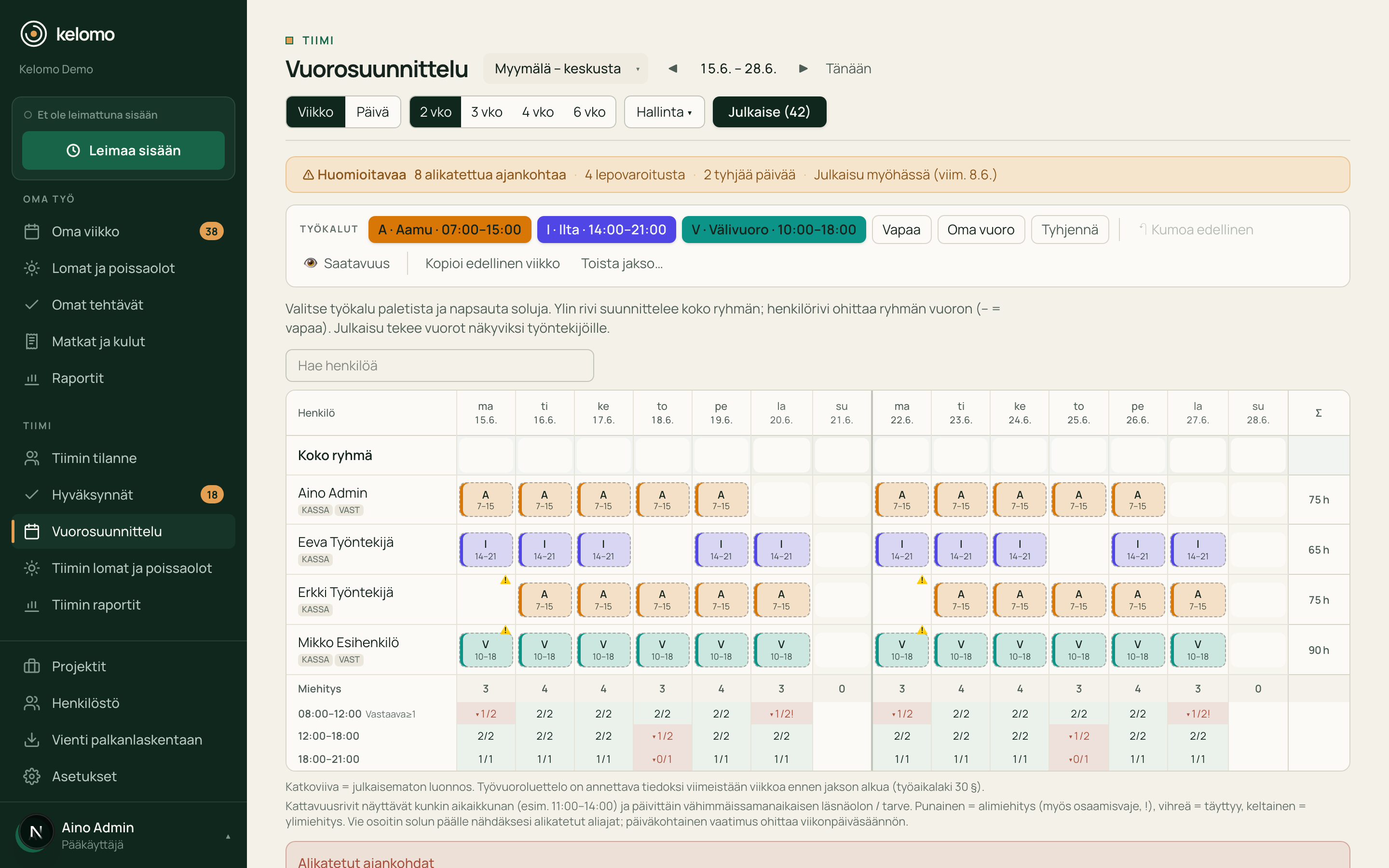
Shift templates for night shifts too, ad hoc extra shifts and recurring rotation with ready-made patterns (2-2-3, DuPont and weekly rotation) – teams run the same pattern from different starting phases.
Solution · shift work
Kelomo shows staffing gaps and rest-period risks before publishing. A published shift becomes the workday and the actuals without a separate hour list.
Uses the shift planning add-on (€3/user/mo)
Shift work pain points
In Kelomo the plan and the actuals are the same data: gap, rest period and swap show before they become a problem.
See shift planningWhat Kelomo does in shift work
Shift templates for night shifts too, ad hoc extra shifts and recurring rotation with ready-made patterns (2-2-3, DuPont and weekly rotation) – teams run the same pattern from different starting phases.
Auto-fill proposes how open shifts get filled, and the best replacement for absences – always as an explained draft the supervisor approves.
Concurrent presence and gaps at the time-window level, while the roster is still a draft.
The right competence in the right shift: the required qualifications are part of planning.
The employee proposes a swap or takes an open shift in the app, and the supervisor approves with one decision – who is at work always shows in the system.
Employees sign up for open shifts and the round is resolved by rules. Fairness is tracked over time – including the burden of night, weekend and public-holiday shifts.
Rest periods
Kelomo checks the statutory rest periods during planning, not only in payroll. The check flags the risk – the decision always stays with the supervisor.
Industries
Morning, evening and weekend shifts, varying opening hours and seasonal peaks in the same view.
Period-based work, round-the-clock staffing and qualification requirements as part of planning.
Regular shift rotation, night shifts and shift-by-shift staffing need along the line.
Seasons, shifts filled at short notice and rapidly changing need – the gap shows in time.
Frequently asked
Both. The gap shows at the time-window level, and auto-fill proposes the fill within the rules – an open shift can also be offered to employees as self-service. The supervisor always approves the outcome.
Employees request swaps, offer open shifts and sign up for open shifts in the app. When several want the same shift, the round is resolved by rules and fairly. Fairness is tracked over time: the burden of night, weekend and public-holiday shifts and how wishes are met is visible to the supervisor as planning support.
Yes – during planning. The check supports the supervisor’s decision – it does not replace it.
Yes. Staffing needs and qualification requirements are defined per unit, so different sites can have their own requirements; shift templates are shared across the company and available in every unit. The same person can work in several units: there is at most one shift per day, and rest periods are calculated from all of the person’s shifts across units.
No. A published shift creates the frame of the day, which the employee confirms. The plan and the actuals are the same data – hours are recorded only once.
Shift planning is an add-on (€3/user/mo) only for the users who need it. Time tracking, confirmation and balances are included in the base price.
Build the shift templates, check the staffing before publishing and handle swaps in the same service.
Opening in September 2026 · 30 days free from launch, no card required